Skip to content

Parrot Scribe - Local Transcription & Privacy-First Audio Capture

Parrot Scribe is a professional-grade local transcription tool designed for macOS. Powered by WhisperKit and optimized for the Apple Neural Engine, it features 100 percent on-device processing, ensuring that no audio or text ever leaves your machine. You decide where your data goes - local models, cloud APIs, or nowhere at all. Key features include unlimited transcription with no per-minute fees, MCP server integration for AI agents, and seamless integration with other developer tools and LLMs via the TOON standard. Ideal for users seeking a private, secure, and composable alternative to MacWhisper, Aiko, or cloud-based transcription services like Otter.ai, Fireflies or Rewind.

Every voice. Every word. Always private.

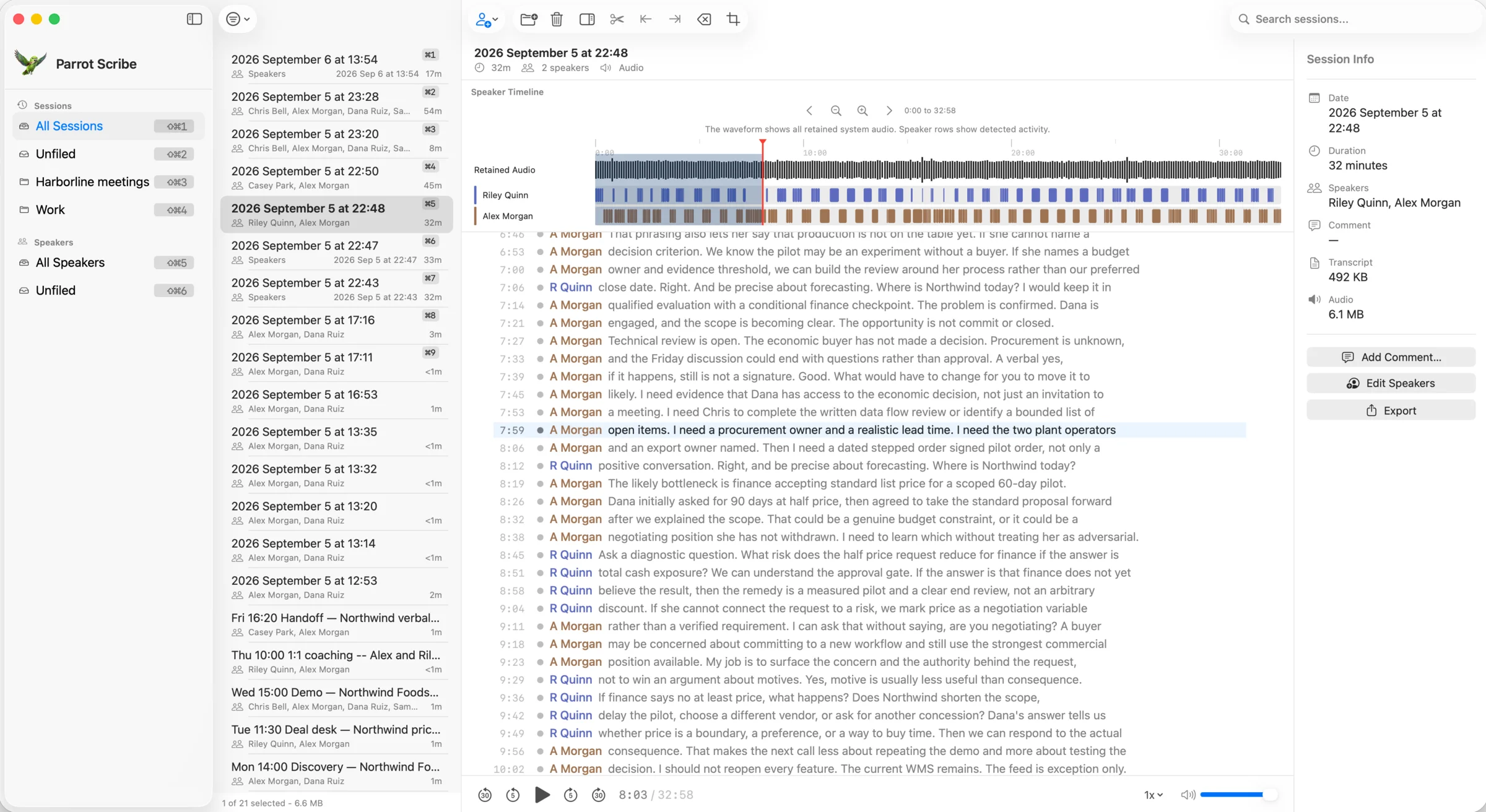
ParrotScribe Session Viewer showing transcript and speaker labels

Professional transcription that runs entirely on your Mac. Always-ready in your menu bar, no meeting bots, and optional real-time AI assistance.

Powered by Apple Neural Engine. Your audio stays on your device for transcription.

No Meeting BotsReal-time ContextOn-device processing

7-day free trial - no credit card required

What You Get

Professional transcription that respects your privacy.

No Meeting Bots

Capture audio directly from your system. No uninvited guests, no 'bots' in your calls, and no cloud processing.

Always Ready

Parrot Scribe lives in your menu bar, ready the instant you need it. One click or one keyboard shortcut.

MCP Integration

Connect your transcripts to AI tools through the built-in MCP server whenever you choose, including optional live transcript context during active sessions.

Speaker Recognition

Never wonder who said what. Parrot Scribe remembers voices across sessions and labels them automatically once named.

Encrypted Storage

Your transcripts and recordings are encrypted from the first byte. If you delete a session, the keys are destroyed - the data becomes unrecoverable.

Instant Recall

Find the exact decision, quote, or commitment from any meeting in seconds. Your full transcript history stays searchable on your Mac.

Product Tour

See Parrot Scribe in action across session review, speakers, and attribution.

Session viewer showing transcript, speaker labels, and playback controls

Session Viewer

Review full sessions with synchronized transcript navigation, timeline context, and audio replay. Jump to exact moments, verify speaker labels, and refine identification quickly.

Speaker attribution view with remembered speaker labeling

Speaker Attribution

Label new speakers and review segments tagged as uncertain. Known speakers are recognized automatically.

Session Library

Browse, search, import, comment on, and open complete sessions with audio and transcript metadata. Drag and drop recordings from Voice Memos and most standard audio files.

Speaker directory with Elena selected

Speaker Directory

Review enrolled speakers, quality signals, and manage voice profiles in one place, including right-to-be-forgotten removals with cascading session deletion.

From Sound to Signal

Four steps from spoken word to composable data.

1

Install

Download, grant permissions, done. Parrot Scribe runs quietly in your system tray, ready when you are.

2

Capture

Start recording with a click or a keybinding. Parrot Scribe captures both sides - your mic and system audio simultaneously, with no meeting bot invite required. Avoid bot join failures and avoid signaling recording with an extra participant in the call. Can't take the call on your computer? No problem. Record however you want, then drag-and-drop files into your Library when you're back. Drag and drop recordings from Voice Memos and most standard audio files.

3

Review

Browse, search, and annotate your transcripts. Parrot Scribe keeps everything organized and easy to find.

4

Connect

Optionally connect AI agents to your transcripts via the built-in MCP server. Claude, Cursor, and other tools can access live and historical transcript context, including live transcript updates during recording, when you decide to enable it.

Lex the parrot with quill and headphones, representing the transcription workflow

Why No Meeting Bots Matters

Cloud bots can miss joins, signal recording instantly, and add unnecessary friction. Parrot Scribe captures directly from your Mac instead.

No Bot Join Failures

No extra participant needs to join your call. Capture starts when you start it.

Less Social and Legal Friction

Bot presence can be a recording giveaway. Direct capture avoids adding a visible participant to every meeting.

Your Capture, Your Rules

Record mic and system audio directly on your device, with optional AI workflows only when you enable them.

* Recording laws vary by jurisdiction. You are responsible for complying with applicable consent and privacy regulations.

Pricing

One-time purchase. No subscription. Unlimited transcription.

Exclusive Early Access Offer

Lock in your price now!

1 Device

$49$19

excl. VAT

Save $30!

  • Unlimited transcription
  • No per-minute fees
  • No usage caps
  • On-device processing

14-day money-back guarantee

Work + Personal

2 Devices

$59$27

excl. VAT

Save $32!

  • Unlimited transcription
  • No per-minute fees
  • No usage caps
  • On-device processing

14-day money-back guarantee

3 Devices

$69$33

excl. VAT

Save $36!

  • Unlimited transcription
  • No per-minute fees
  • No usage caps
  • On-device processing

14-day money-back guarantee

Security You Can Trust

Hardware-backed encryption. Zero configuration.

Hardware-Backed Encryption

Your transcripts and recordings are encrypted from the first byte. AES-256-GCM protects your data, with keys protected by your Mac's security hardware.

Hardware-Protected Keys

Your encryption keys are locked inside dedicated security hardware on your Mac - impossible to extract, even with physical access.

Private by Design

Audio stays on your Mac because the app is designed that way. No cloud transcription and no speech data leaves your device for transcription.

Ready to keep every conversation private?

Download Parrot Scribe for macOS and start capturing meetings without cloud transcription or meeting bots.